> For the complete documentation index, see [llms.txt](https://about.petopiagame.io/llms.txt). Markdown versions of documentation pages are available by appending `.md` to page URLs; this page is available as [Markdown](https://about.petopiagame.io/tutorials/guild-tournament-season-2-kings-of-battle/guide-to-claim-season-2-rewards.md).
# Guide to Claim Season 2 Rewards
The Season 2 has concluded, and we've officially crowned our champions.\
\
There are three types of rewards in Season 2
1. **ETH Rewards:** You can claim these starting March 27, 2024, at 3 am UTC. Below is the guide on how you can claim them on the [GuildTech website](https://guildtech.mirailabs.co/).
2. **In-game Rewards:** They'll be added to your inventory around the same time, and you'll also get a notification in your in-game mailbox.
3. **NFT Rewards:** Details on claiming these will be announced at a later date.
The total amount of ETH reward a guild will receive will be divided into 3 funds with the ratio that the Guild Owner has set.
* **Guild Owner Funds:** The total amount will go directly to the Guild Owner
* **Fraction Owner Funds:** The total amount in this fund will be divided into Fractions Holders depending on how many Fractions they hold.
* **Member Funds:** The total amount in this fund will be divided among Guild Members depending on how many Trophies they earned. If the Guild has 0 trophies, the reward will be divided equally among all members.
## How to Claim
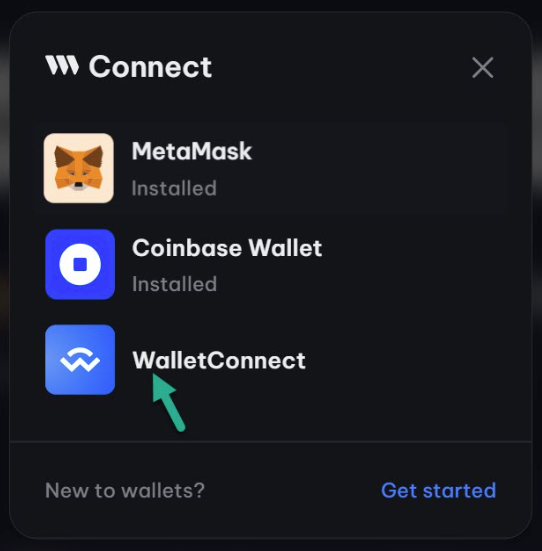
* Step 1: Connect your Mirai Wallet to GuildTech.\
Go to the [GuildTech website](https://guildtech.mirailabs.co/). Click on \[Connect Wallet] → Choose the \[WalletConnect] option → Use Mirai Wallet to scan the QR Code → Tap \[Accept] on Mirai Wallet to complete.
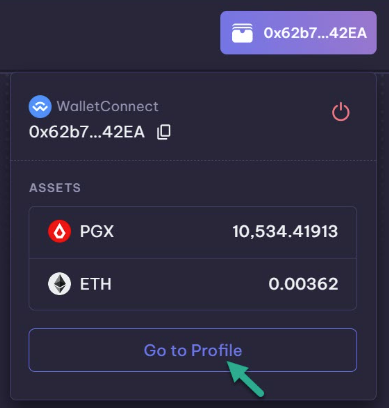
* Step 2: Go to your GuildTech profile by clicking on the wallet icon in the top right corner of the top bar, and then click on \[Go to Profile].
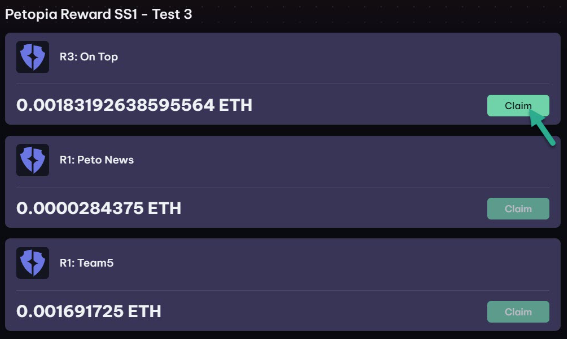
* Step 3: Claim your rewards by clicking on the \[Claim] button in the reward section. Sign the transaction on the Mirai App to complete the reward claim.
R1: Rewards for the Fraction Holder from trading fees collected by the Guild.\
R2: Rewards for the Guild Owner from trading fees collected by the Guild. \
R3: Rewards for the Seat Owner from trading fees collected by the Guild. \
R4: Rewards for the Guild Owner from Season Rewards.\
R5: Rewards for the Fraction Holder from Season Rewards.\
R6: Rewards for the Seat Owner from Season Rewards.\
\
That concludes our guide! Enjoy the fruits of your efforts! If you encounter any issues or have additional questions, don't hesitate to reach out; we have [24/7 customer support](https://discord.gg/petopia). We look forward to seeing you in the next season!