# Move NFTs (Metamask/Mirai Wallet)

In this guide, we'll show you how to import and transfer your Hero NFT from both Metamask and Mirai Wallet for easy transfers!

Follow these steps closely.

### Proceed with these steps first:

1\. Go to [Etherscan](https://etherscan.io/) and search your wallet address.

<figure><img src="https://lh7-us.googleusercontent.com/zQFHdgDiMgYAVPDvYYx3oiLhjnz4qq_GXqj7HUmzLRVmh6_AXOPVKABBy-UV3v39JP7iOCREXwu-mMGQEdRTif6ra_TUvenemX6wFcNyGaI5iotzZ0HwpLINjgLm05r04nqIIhYV4520o65Ip4jZIxo" alt=""><figcaption></figcaption></figure>

2\. Click on \[NFT Transfers] in your wallet.

<figure><img src="https://lh7-us.googleusercontent.com/u3Ssmkle5r0KgyxrzmQQEN-5miEZJ_znJvDj28bDOZyhlh5WN8Azv8gEE2XWrYvIThP3ZCoMYm5mBWJoapy1XSgP9TuytZgoX7Lf6qhvTRPdbWvFNxv07A6qpIPv2Hlj3h7e-1PFbkzdmBkSaoYZWLY" alt=""><figcaption></figcaption></figure>

3\. Click on the NFT you want to transfer. In this example, \[Fox #1].

<figure><img src="https://lh7-us.googleusercontent.com/zMj0txTYhFqxdWtqRAYRRy9dqqekK-6Ke0ZNE3X4ewPaTZgC3Qn_Xkmt_11N4ERrCUlHUD1qMzpFKItUBezinmCZ6gPZ866YGg-KGYIscL5PfysnGi_XJ41xQsX2FQ-ZPbKYDUN-nrlqy3XHQJR7rL4" alt=""><figcaption></figcaption></figure>

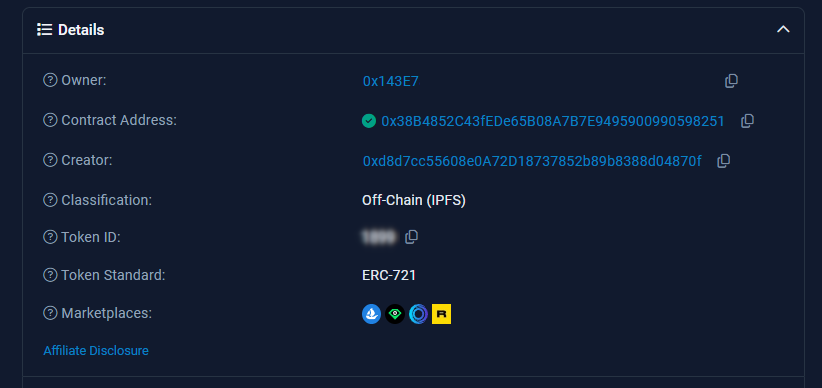
4\. Copy the \[Token ID] of the selected NFT.

<figure><img src="/files/i1iDBOYUjenDHMcDzIun" alt=""><figcaption></figcaption></figure>

### Importing your NFT to view, then send:

To send, we're going to have to import the asset.&#x20;

**To do this, start with whichever holds your NFT first (Metamask or Mirai Wallet).**

### Metamask:

1\. Open MetaMask (Ethereum Network) and go to NFTs.

<figure><img src="https://lh7-us.googleusercontent.com/dxBWCSHIN0mN6KKLXg2NBwQwsIIEL3qE_fU3Tm6jR58pQP134poSyPO68RRNlQPH0FS3N9iquLs9tvSYeDxaJaDF_3ZnNBERbd55QxJOkENvZANaZR7NdAIzQt41DWR4KpkyTAp6iH7hmCp730jW6gY" alt=""><figcaption></figcaption></figure>

6\. Scroll down and click on \[Import NFT] and enter:

<figure><img src="https://lh7-us.googleusercontent.com/JFRf9ZOt86kHuEJRIKZV3SRvkdWdXpROW1ejsOJ6qiDAiVyvSZ6Rild_GeV5F1YT0sQ6P7ye6nFaSTtQ3S5MM7bs8Lsm-bsved-B0w861aujsBExxGZJXhPEIDAVbXkY-WwtNQJA0QE3P3Xr2xXGpVc" alt=""><figcaption></figcaption></figure>

* **Contract Address:** 0x38B4852C43fEDe65B08A7B7E9495900990598251
* **Token ID:** \[Token ID of your NFT]
* Click on Import.

Now that it's imported, you can send your NFTs to another Metamask Wallet or Mirai Wallet!

Copy your Mirai Wallet address and send it there if you want to transfer from Metamask to Mirai Wallet.

### Mirai Wallet:

1\. In the Mirai App, tap the Wallet Icon, Collectibles, then \[Manage Collectibles].

<figure><img src="https://lh7-us.googleusercontent.com/IQWNvlG6yuzdoFQaQgm02v4DS5BAc96h3aRLuvzMWv6nsvzDkJA117f4quiwpG3ARbLX79zDWhPg6JQZjl5c4DY1ABqcom7AOLYNPudqtjKXgSlJVyrW3ap5ERk4_uu9tguisRBK3FGENokCqNfyv9M" alt=""><figcaption></figcaption></figure>

2\. Tap on \[Add Collectible] to start importing.

<figure><img src="https://lh7-us.googleusercontent.com/7lepcu-VZdK3wi5K2kBiqk1BZB41oU1J6IVgNR4aEPlcTWbkym670blxBmewW7V7SOLtwzVnf7k-oqvuwASjBmqZ_HgAWnTsbew2xvybCPE3KpqovMXpCl54vfCTavm_PgA7cwb7VVe51OQfn7T2X7A" alt=""><figcaption></figcaption></figure>

3\. Enter the same Contract Address & Token ID, and Add Collectible.

<figure><img src="https://lh7-us.googleusercontent.com/RfqqHvmKM2gETkBq2VFaSkEHdCarXlNubuOsD4zDWa89i1Gc7mfGGXH1NHtMEAlsHMYmpJUZbzgODwWl_xwA8JAjd0uveC7iAVkLHZk5eh7zUWPReHXlQVEvpFTS7FiZOlei_TaVNfjRAk0RvBA97vc" alt=""><figcaption></figcaption></figure>

* **Network:** Ethereum
* **Address:** 0x38B4852C43fEDe65B08A7B7E9495900990598251
* **ID:** \[Token ID of your NFT]

Now that it's imported, you can view and send your NFTs to another Mirai Wallet or Metamask Wallet!

Awesome! Now it's time for you to decide what you want to do with your newly transferred NFT in the Mirai Wallet! We can't wait to see how our players handle their assets.


---

# Agent Instructions: Querying This Documentation

If you need additional information that is not directly available in this page, you can query the documentation dynamically by asking a question.

Perform an HTTP GET request on the current page URL with the `ask` query parameter:

```
GET https://about.petopiagame.io/tutorials/move-nfts-metamask-mirai-wallet.md?ask=<question>
```

The question should be specific, self-contained, and written in natural language.
The response will contain a direct answer to the question and relevant excerpts and sources from the documentation.

Use this mechanism when the answer is not explicitly present in the current page, you need clarification or additional context, or you want to retrieve related documentation sections.